
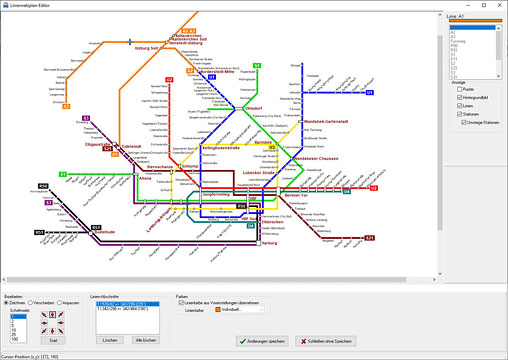
LineMap-Draw available in revised and expanded version
LineMap Draw is a programme for creating schematic line network maps. The new version now supports the complete Unicode character set with all relevant country-specific letters and special characters. LineMap Draw is available in several versions.
A line network plan, also known as a network spider, is used to schematically represent public transport networks. Different colours are used to distinguish between individual lines. In most cases, topographical accuracy is sacrificed in favour of a clear and space-saving design. The lines run only horizontally, vertically or diagonally at a 45° angle.
With LineMap Draw, you can create line network maps yourself, saving time and money. This makes LineMap Draw an efficient alternative to image editing or vector graphics programmes.
To create a route network map, first enter the existing stations and lines and assign them accordingly. You can then create various network maps, for example for the entire network, the rapid transit network or the night network. In the network map settings, you can configure the image size, colours, background image, fonts, text spacing and alignment, and the properties of the station symbols. Finally, the lines are drawn and the stations are positioned.
The route network map can be scaled to the desired size for output. Since the map is completely redrawn in the process, the quality losses that often occur otherwise – such as blurred edges – can be prevented.
The line network plans can also serve as a basis for printed plans, which can be supplemented with additional graphics and design elements. Of course, the plans can also be inserted into other applications, such as word processing or image editing programmes, using the clipboard.
The most important innovations at a glance
- The character set has been converted to Unicode. While the previous version still uses the ANSI character set, the new version uses the Unicode character set. This means that, in theory, over a million different characters can be displayed. Currently, over 150,000 characters are in use and the characters of most countries are integrated. Projects from the previous version are converted automatically.
- A multi-line input field is now available for entering new stations, so that several new stations can be entered at once.
- In addition to images in Windows bitmap format (BMP), images in GIF and JPG format can now also be selected as background images.
- Stations can now also be positioned on the line network plan using the mouse.
- The ‘Auto’ button places the current station at the automatically determined position.
- The automatic positioning of all stations that have not yet been positioned using ‘Distribute stations’ has been optimised. Stations that already exist on another line are in most cases placed directly in the correct position.
- The changes have been included in the updated LineMap Draw manual. The manual has also been revised and expanded with additional chapters.
Editions & prices: The right solution for every need
LineMap Draw is available in five editions (Home, S, M, L and XL), which differ in terms of the image resolution they support. While the smallest version, LineMap Draw Home, is suitable for internet projects in the leisure/hobby sector, the largest version, LineMap Draw XL, can be used to create line network maps in A0 format or larger. As the viewing distance also increases with size, the line network plans can also be used for large-format posters.
The licence models are deliberately designed to be user-friendly: pay once, use forever – no subscription, no hidden costs.
System requirements: Compatible and resource-efficient
LineMap Draw runs on the current Windows versions 8, 10 and 11. Prices range from €29 for the Home version to €249 for the XL version. Further information and a free demo version can be found at www.en.ptraffic.net.
Press contact: Jörg Siebrands, software development, Sagekuhle 20, 21614 Buxtehude, Germany
Tel: (+49)4161/597079, info@ptraffic.net, www.en.ptraffic.net/press.htm